
Publishing and review
This page is a tutorial. Sign in to Reveland to create and save a character. The entry currently opens detailed creation.
Choose visibility in the editor
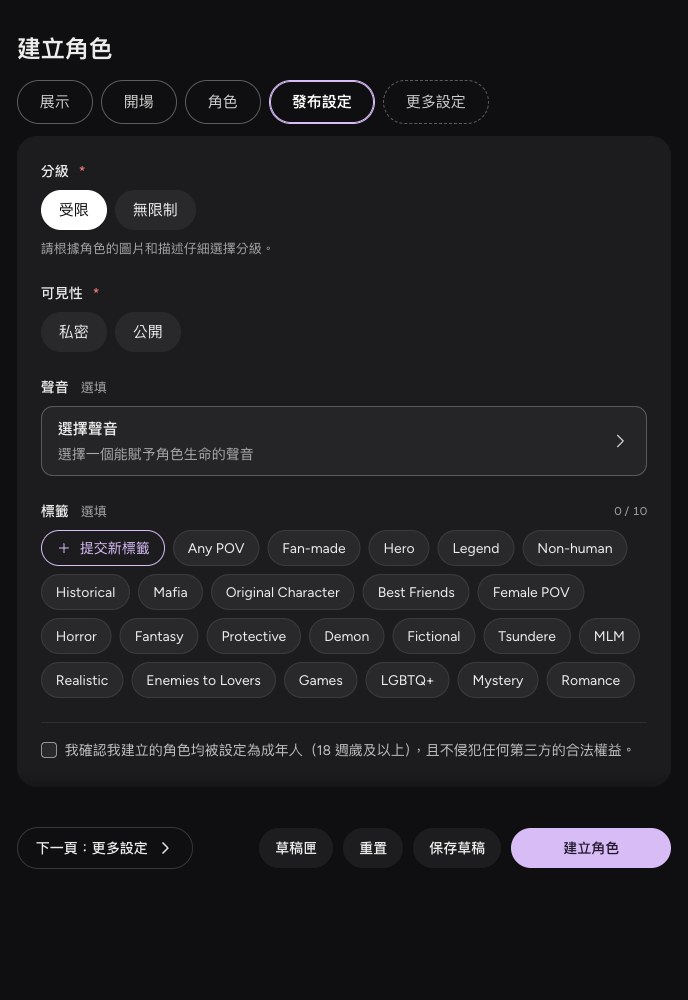
Open Publication settings on Reveland, choose private or public, and read the creation declaration. Set an optional voice and tags as needed. Rating choices do not exempt content from the rules.
Private work
Private characters are available to their author and do not enter public discovery. Private visibility does not exempt work from the content rules.
Public work
Public work must pass review before becoming available to other players. Choosing public visibility and submitting starts that process. Successful creation, successful saving and review approval are different states.
Before submitting, check the images, introduction, opening and any background you intend to show. Remove private information, infringing material and prohibited settings.
Changes and review results
Changes to public work need review again. Until the new version is approved, players still see the existing public version. Saving an edit does not immediately replace public content.
If review is declined, read the reason in the notification, change the relevant content and resubmit. After a takedown, address the violation and follow the resubmission process. Affected existing stories may become read-only; follow the notice to view available history.
Ask for a decision to be checked
If you disagree with a decision, provide the work's location, the notification and an explanation through support. Do not repeatedly submit the same unchanged prohibited content.